It's pretty clear the first time you load up Delusion Studio's House of Mice [99�] that one of the developers is a big fan of Hanna-Barbera cartoons. It's not just because you're playing as a group of mice hell-bent on destroying a cat, it's also because the game features some of the slickest animation you'll find in a puzzle game.
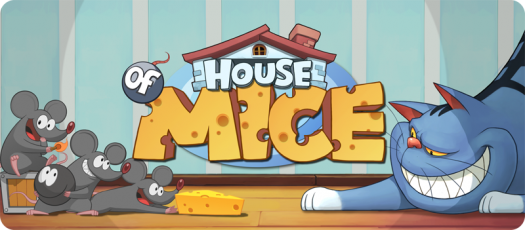
Unless you've never booted up the App Store in your entire life, you're going to recognize House of Mice right away. It's a one-screen puzzle game that requires you to get from one point to another while grabbing onto three tasty pieces of cheese. The game certainly looks the part of Cut the Rope or its countless iterations, but the gameplay takes a different, albeit familiar approach.

House of Mice is essentially billiards with mice that turn into bombs. To complete a stage, you need to flick one of three mice through a set of obstacles and into a cat that bears a striking resemblance to the Cheshire Cat from Alice in Wonderland. Along the way you'll want to pick up pieces of cheese to improve your score, but if you're struggling with a particular level, killing the cat will suffice.
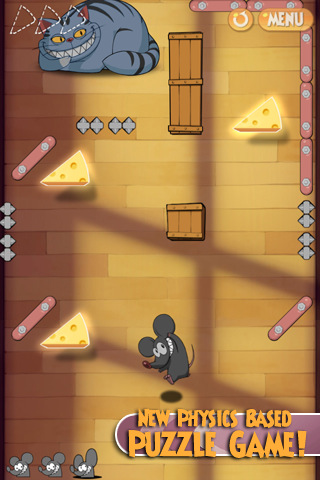
The game currently features 80 levels spread across four different areas and as you progress through them, new obstacles are introduced. Boxes will block your path that require one or two mice to destroy, pipes will transfer you over to another part of the level and fans and magnets will alter your pathway. You'll oftentimes have to bounce a mouse off a wall and into a box to sacrifice it so another can pass through to kill the cat. The quicker you do so, the higher your score.

As of right now, you'll only be competing against yourself for those high scores, but as noted in the forums, Game Center and Facebook integration is coming in the next update (as well as a Lite version). That's lgoing to help offer more in the way of replayability for anyone obsessed with high scores, as it's not just about grabbing the cheese and exploding the cat, but how quickly you can do it.

While the gameplay is far more original than it looks on first glance, the real appeal is its visual style. Not only is the premise derived from classic Tom and Jerry cartoons, but the entire look of the game is. It's a beauty to behold and the visuals look like the hand-drawn animation cells of '40s classics. There aren't a whole lot of moving parts in the game, but when there are, you'll be wishing you were playing on an iPad just to get a closer look at them.

If you needed more proof of the games visual importance, you can click through the "Extras" screen to watch the opening video, the credits and the ending video again. They're short, but they're well worth watching for their style alone. The fact they're included at all is an indication of their merit.

It might sound a bit like this is a case of style over substance, but while House of Mice's wrapper is certainly its most delicious part, the gameplay inside still gets by as an enjoyable, easy to grasp concept that offers enough of a challenge to keep it interesting. If you enjoy puzzles with a heavy emphasis on light-geometry, you'll love what House of Mice has to offer, but even if you don't end up getting into the gameplay, it's hard to deny how great it looks.

<!-- PHP 5.x -->


Powered By WizardRSS.com | Full Text RSS Feed | Amazon Plugin | Settlement Statement | WordPress Tutorials

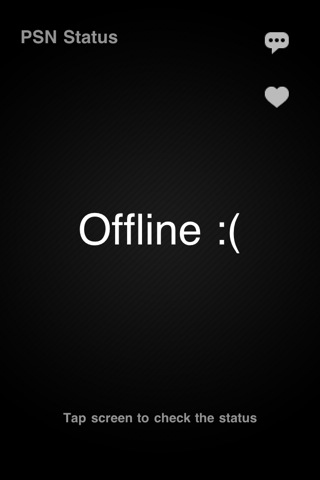
If you are amongst the millions of iPhone owners who also happen to have PS3's, I've got the perfect app for you. Behold, PSN Status [Free]. This free app will tell you both quickly and easily whether or not PSN is up. Sure, it would have been much more useful last month, but it will be handy to keep around if/when PSN goes down again.

Oh also, on the subject of PSN being down, if you're like me and really only use your PS3 for watching BluRays, don't forget to claim your free games. Even if you weren't really affected by the downtime in any real way, you're still eligible for two free PS3 games and two free PSP games. The selection is surprisingly decent, too.

On a somewhat related note- If you're a proud PS3 console warrior and your pride has taken a substantial hit over the last month as you were the brunt of countless "PSN is down" jokes from your Xbox 360-loving friends, don't forget to also download i360Emu [Free]. It's a shockingly accurate emulator of early Xbox 360's, or, it was, before they changed the power-on animation.

<!-- PHP 5.x -->


Powered By WizardRSS.com | Full Text RSS Feed | Amazon Plugin | Settlement Statement | WordPress Tutorials

Swedish indie developer Eric Svedang�has recently released a new game named 'Tri Tri Triobelisk' [99�] for the iPad. I've been following Erik's work for a while, so was totally interested in checking it out. Any discussion of�Tri Tri Triobelisk really begins with his earlier game,�Shot Shot Shoot [$1.99], so let's examine that first.

In�2010, Eric released�Shot Shot�Shoot! for the iPad. It's one of those games you may not have heard of, however�Frank Lantz (the designer of Drop7 [$4.99]), is quoted as describing it as "the first truly great game for the iPad. Essential."

Erik describes his game as a "Digital board-game" for the iPad; it could also be easily described as a top-down shooter. Two players sit facing each other, on the same iPad and each player has five squares on their side of the board. The goal is to destroy your opponents five squares before they destroy yours. Tapping on one of your squares fires a shot directly towards your opponent, but if you hold your finger down, you can optionally redirect that shot while it's traveling, allowing your bullet to swerve around other bullets or to change targets. This is best illustrated by watching a gameplay video:

Shot Shot Shoot is a game of strategy. Some players fire strategically, picking their shots, while others prefer to play offensively, mashing the buttons to overwhelm the opposition with a swarm of shots.�If you fire like crazy, you'll end up defenseless, as you have a limited supply of bullets which take a while to regenerate. Alternatively, you can shoot at grey squares in the middle of the screen to collect bullets, but your opponent is seeking these too.�Another strategic element is that the more shots you have active on the screen, the slower they all move. This means a single shot can travel faster and often zips across the screen to save the day. Many frantic and exciting games are won by a millisecond.

This month, Erik released Tri Tri Triobelisk which is promoted as a faster and more extreme remix of�Shot Shot Shoot.�Check out the trailer compared to the previous Shot Shot Shoot video:

The unusual title is named after electronic artist�Triobelisk, who composed the energetic dance soundtracks. The�minimalistic square graphics of�Shot Shot Shoot are replaced with a space backdrop and triangles replace the squares, with shots now leaving different trails behind them. The game modes, basic gameplay and controls remain unaltered from�Shot Shot currently, however Erik revealed in the thread on our forums�that he's currently developing power-ups as a future addition to Tri Tri, which I can't wait to see.

While I'm a fan of both games, it's unusual to have two games with the same basic gameplay, from the same developer. People with�Shot Shot already may be hesitant to buy the new game as well and would probably have preferred that game to be extended too via an update of sorts. Having played both games, I appreciate each for different reasons.�Shot Shot has simple and clean graphics.� Tri Tri has more energy and more music and may have more widespread appeal.

If you're not sure which game to try, I recommend�Tri Tri Triobelisk.�The "introductory price" for�Tri Tri is currently cheaper than�Shot Shot and has potential to be updated. Erik plans to keep�Shot Shot as the "minimalistic gentleman's game" with�Tri Tri being the "crazy over the top version". If you specifically love artistic minimalistic games, get�Shot Shot, otherwise Tri Tri Triobelisk seems to be the way to go.

<!-- PHP 5.x -->


Powered By WizardRSS.com | Full Text RSS Feed | Amazon Plugin | Settlement Statement | WordPress Tutorials

Resolution

How to avoid installing this malware

If any notifications about viruses or security software appear, quit Safari or any other browser that you are using. If a normal attempt at quitting the browser doesn't work, then Force Quit the browser.

In some cases, your browser may automatically download and launch the installer for this malicious software.� If this happens, cancel the installation process; do not enter your administrator password.� Delete the installer immediately using the steps below.

  1. Go into the Downloads folder or your preferred download location.
  2. Drag the installer to the Trash.
  3. Empty the Trash.

How to remove this malware

If the malware has been installed, we recommend the following actions:

  • Do not provide your credit card information under any circumstances.
  • Use the Removal Steps below.

Removal steps

  • Move or close the Scan Window
  • Go to the Utilities folder in the Applications folder and launch Activity Monitor
  • Choose All Processes from the pop up menu in the upper right corner of the window
  • Under the Process Name column, look for the name of the app and click to select it; common app names include: MacDefender, MacSecurity or MacProtector
  • Click the Quit Process button in the upper left corner of the window and select Quit
  • Quit Activity Monitor application
  • Open the Applications folder
  • Locate the app ex. MacDefender, MacSecurity, MacProtector or other name
  • Drag to Trash, and empty Trash

Malware also installs a login item in your account in System Preferences. Removal of the login item is not necessary, but you can remove it by following the steps below.

  • Open System Preferences, select Accounts, then Login Items
  • Select the name of the app you removed in the steps above ex. MacDefender, MacSecurity, MacProtector
  • Click the minus button

Use the steps in the "How to avoid installing this malware" section above to remove the installer from the download location.


Powered By WizardRSS.com | Full Text RSS Feed | Amazon Plugin | Settlement Statement | WordPress Tutorials