The Nokia E7. Nokia's answer to its loyal Fans who were waiting for a worthy successor of the Communicator. It's also the answer to all QWERTY fans, finally wanting to get rid of their horrendous N97s. Announced at last year's Nokia World in London, Nokia has set out to please fans from both camps. I have decided to gather my thoughts on the Nokia E7 in something called Hits and Misses � I will look at certain details of the Nokia E7 and either give it a plus or a minus � a hit or a miss. So what is an absolute hit for me? And where is Nokia missing something? Read on to find out what grinds my gears.
 Nokia E7 Hits
:
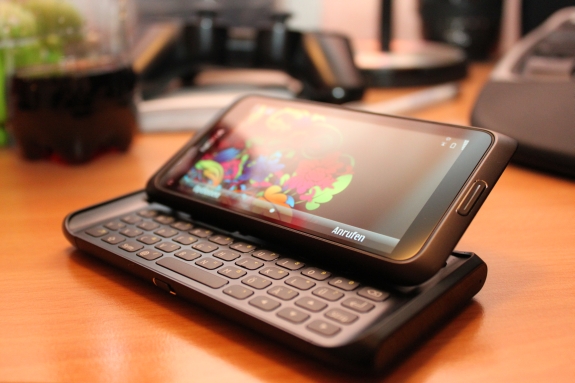
Build Quality: Let's make one thing perfectly clear. Nokia is MILES ahead of everyone when it comes to build quality. Like the Nokia N8, the E7 is built like a tank. It is made from the same anodized aluminum, and thus features a feeling you won't get anywhere else. Coming from a lot of old Nokias and recently Android devices like HTC Desire, Samsung Galaxy S and Nexus S, it is clear who is my absolutely favorite here. Everything is rock-solid and in closed position, the E7 feels like a candybar device. Even the plastic caps that hide the battery and antenna modules don't feel like they'd come off anytime soon. THIS is how you build a phone, thank you for reminding everyone about that, Nokia.
Slide-open full QWERTY keyboard and its slider hinge: Let's start off with the slider that reveals and closes the hardware QWERTY, and it is a textbook example of how to build something like this! As i said before, in closed position, the device feels like a candybar, you wouldn't believe it consists of two pieces. And funny enough, a lot of people who didn't know the Nokia E7 before, thought it was a candybar. Slide it open, in this N97-like angle and you still won't feel any give. Amazing. Sliding it open, will reveal the biggest selling point of the Nokia E7, its full-blown QWERTY keyboard. �You see, i have tried and worked with a lot of different keyboards, on different brands and different devices. From some of Nokia's earlier Communicators and N97s, the more modern likes of SE X10 mini pro, Vivaz Pro, the T-Mobile G1, the absolutely horrendous Motorola Flip out and many more. From all those mentioned Devices and all phones ever made, the Nokia E7's keyboard is the best one i have ever seen, hands down. It doesn't get any better than this. Nokia made the great decision to go away from the 3-row disaster on the N97/mini, and due to the big 4? screen, gave it a fourth row, which in my opinion is the best deal. The keys are well spaced, give a great feedback and are just perfect in size. You don't have the Milestone-typical problem of the furthest row being too close to the screen part. One could complain about the special keys like Ctrl or Shift only being available on one side, but i actually prefer this, instead of having more keys which would ultimately result in a loss of space and a more crammed keyboard. The space bar was put in the middle again, just where it should be. This keyboard is perfect.
 Clear Black Display (CBD):
 Before i received this trial unit of the Nokia E7, i was given a C6-01 to play with. Both devices are the first to come equipped with Nokia's brand new Clear Black Displays. Now i will spare you all the technical rubbish, but what Nokia basically promises, is an AMOLED screen with re-arranged layers in the screen matrix, set to provide a much much better readability in direct sunlight, a nice color reproduction and yes, clear blacks. Did this work out? Absolutely yes. Ladies and Gentlemen, we're talking Super AMOLED levels of awesomeness here. No really. What you get on the Nokia E7, is a 4 inch 640�360 pixels equipped piece of gorgeousness. Visibility in direct sunlight has massively improved, with just minor reflections, but for me the real deal is the levels of black you will get. This is a REAL black, no reproduced stuff from the LCD screens. Apply a theme that has a lot of black elements in it (like PiZero's Digiflower) and see what i mean. Sure, it might be oversaturated, so is any AMOLED screen, but Nokia has really managed to push out something great here.
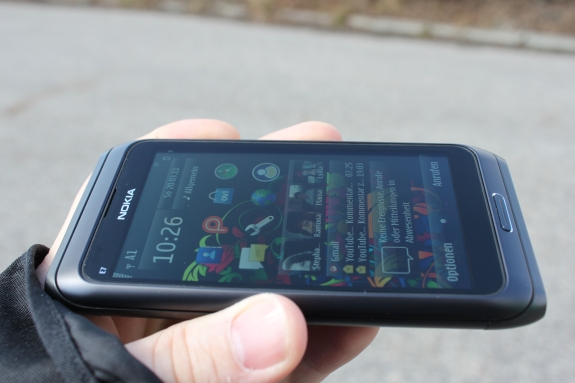 Menu Key in the middle again:
 a minor detail, but a good move in my opinion. If you use the N8 longer than a day, you'll see that the left side-positioned Menu Key is a huge problem in terms of usability. Nokia has fixed that and i like it.
USB on the go and miniHDMI: Well known from the Nokia N8, i just have to give those features a Hit again! USB on the go enables you to connect any (FAT32-formatted) USB stick onto the device via Adapter, which will start the file manager and give you access to the files on the USB-stick. miniHDMI lets you connect the Device to your flatscreens, in a nice crisp 720p output. Both adapters come in the box, which is a nice treat from Nokia.
Enhanced experience for business customers: Clearly labeled as the successor to the communicator-series, Nokia went on down to deliver additional apps and functionality for today's business. I'll be perfectly honest to you, i don't really use them, as i'm clearly not the targeted customer (more on that later on), but some of the new goodies include a full version of Quickoffice, Nokia Mobile VPN functionality and a very nice new Communicator functionality, that let's you chat with contacts you have as Mail for Exchange contacts. I have been told there will be more options to come, like improved calendar features etc.
 Nokia E7 Misses
:
Symbian