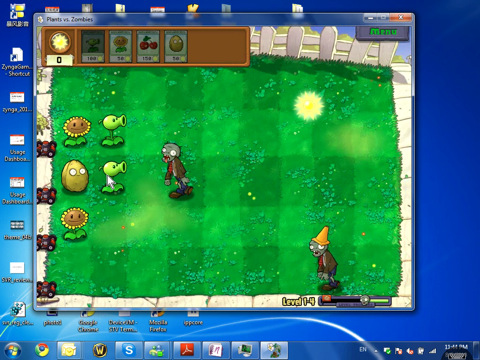
Recently I embarked on a quest to see if there was a way I could stream my PC games to my iPad using the various remote desktop apps available on the App Store. Initially, this resulted in countless hours (and dollars) wasted, only to be disappointed time and time again. Some apps had no audio, others were nowhere near responsive enough, and some of them just flat out didn't work� Then came Splashtop Remote Desktop [99� / Lite / HD].
Splashtop is a remote desktop client that streams your PC or Mac screen directly to your iPad, iPod touch, or iPhone with amazingly fast response times, and full streaming audio. Installation and setup couldn't be easier. All you do is install the desktop software and download the app and you're up and running. Keep in mind, using Splashtop outside of your local network will require fiddling with port forwarding, and unless you've got an insane internet connection, will bring the response time down to be almost unplayable. However, on the same network, Splashtop is basically a 1:1 representation of what is happening on your PC, and is totally enjoyable to game on.

Unsurprisingly, the biggest limitation while using Splashtop is the somewhat inevitable control issue as you're playing games meant for a controller, keyboard, and/or mouse using an odd touchscreen setup. There is an onscreen keyboard but it obscures too much of the screen to be usable. The onscreen arrow keys are nice, but most games require more than just 4 buttons to play.
Windowed games work OK, but for Splashtop to really shine, you need to be playing something fullscreen. I've found that using the OnLive service is by far the best way to game with using this setup. OnLive allows fullscreen play and automatically sets the resolution to your iPad or iPhone's screen. Also the menus are very controller friendly, and these days OnLive not only has a great selection of games, but has tons of free trials.
 Puzzle games seem to work great, as they're mostly mouse controlled which translates well with how Splashtop interprets your touches as mouse movements and clicks. Anything more complex than that really requires a controller. The developers of Splashtop have attempted to remedy this issue by offering a free Splashtop Remote Touchpad [Free] app which you can run on your iPhone or iPod touch, but we've had much better luck using Joypad [$2.99 / Free] which we've already reviewed and liked quite a bit for playing emulated games.
Using your iPad running Splashtop and your iPhone running Joypad, you can do a surprising amount of PC gaming on your iPad. Sure, the setup couldn't be more convoluted since you're using two iOS devices, a reasonably specced out gaming PC, and two different paid apps to do it, but how else are you ever going to be able to play World of Warcraft on your iPad?
Games designed with simple controls in mind work fantastic with this setup. I was able to finish Braid using my iPad and iPhone with minimal interruption or lag. Sure, it might have been better to play with a real controller, but the novelty factor of being able to run (and play) a ridiculous number of PC games this way is sky high.
Depending on your home network, and how powerful your PC or Mac is, most people should be able to duplicate my setup easily with similar results. Keep in mind there are a lot of factors in play when using a remote desktop client like this. This laundry lists includes the speed of your host computer, the overall wireless climate in your area, how fast you can typically transfer data over your WiFi network, how low your local ping times usually are, and more. As mentioned in the Joypad review, if you live in an area where the WiFi selection list on your computer scrolls for ages, there might not be anything you can do to improve things.
While this review has focused on the gaming potential of Splashtop, the amount of things you can do with it is incredible. You're able to use anything you can on your computer, with great response times and audio. Also, seeing how well OnLive works this way really makes me wonder when they're going to turn the OnLive Viewer [Free] into an OnLive Client.
<!-- PHP 5.x -->


 <!-- Begin SexyBookmarks Menu Code -->
<!-- End SexyBookmarks Menu Code -->
<!-- Begin SexyBookmarks Menu Code -->
<!-- End SexyBookmarks Menu Code -->
 In Catch the Candy [